Video SEO is the process of making video content easier to discover, understand, and display in search results.
It includes optimising video titles, descriptions, thumbnails, hosting, structured data, and the webpages where videos appear.
Video SEO applies to both Google Search and video platforms such as YouTube.
For example, a plumbing company might publish a video showing what happens during an emergency call-out. The video could appear on YouTube, be embedded on the company's website, or both.
However, those placements serve different purposes.
A video on a service page may help customers decide whether to contact the business. A video intended to rank on YouTube needs to attract people who are actively searching for that topic.
For most local businesses, video is worth creating when it helps customers understand a service or make a decision, even if the video never ranks in search.
How Does Video SEO Work?
Search engines use several sources of information to discover and understand videos.
These include:
- Video titles and descriptions
- Video thumbnails
- Relevant page content
- Structured data
- Video sitemaps
- Accessible video files
- Information supplied by the hosting platform
For example, a video titled "What Happens During an Emergency Plumbing Call-Out?" gives viewers a clearer idea of its content than one titled "Our Latest Video."
A descriptive title can also help search engines understand the video's subject.
However, optimising the title alone doesn't guarantee visibility.
Google must be able to discover the video, understand its context, and determine whether it is relevant to the search.
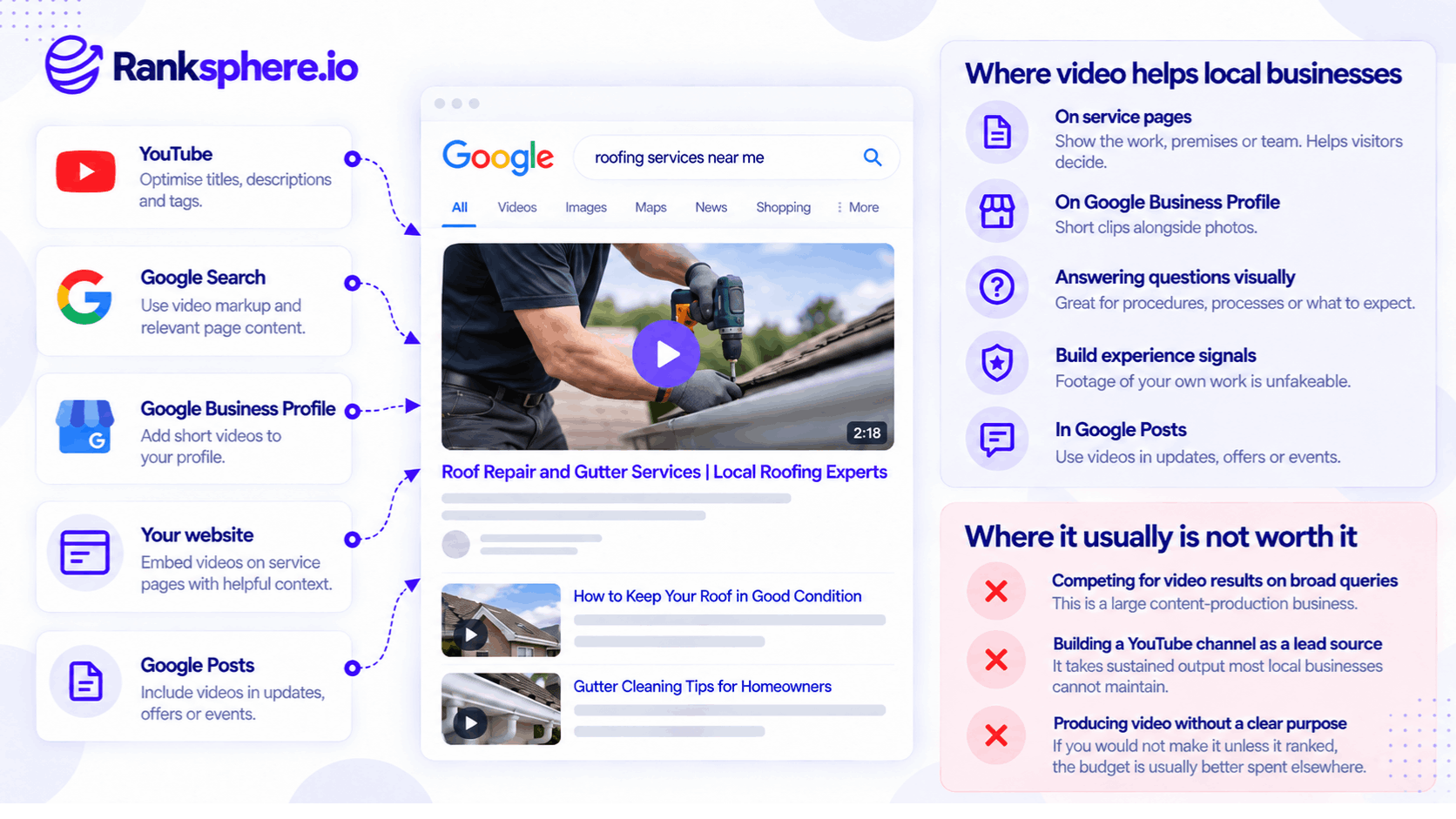
Where Video Helps Local Businesses
Local businesses don't necessarily need large YouTube channels to benefit from video.
Short, useful recordings can support several parts of the customer journey.
Videos on Service Pages
Adding relevant videos to service pages can help customers understand what a business provides.
For example, a roofing company might show footage of a completed roof replacement.
A dental practice might publish a video explaining what patients can expect during an initial consultation.
These videos can answer questions that are difficult to explain through text alone.
They may also help visitors feel more informed before contacting the business.
However, embedding a video isn't a confirmed direct Google ranking factor, and improved conversion rates shouldn't be assumed without measurement.
Videos on Google Business Profile
Businesses can add eligible videos to their Google Business Profile, alongside photos.
For example, a restaurant might upload a short video showing its dining area.
A contractor might share footage of a completed project.
These videos help customers see the business, premises, or work before making contact.
However, Google doesn't confirm that uploading videos directly improves local rankings.
Videos That Answer Customer Questions
Some questions are easier to answer visually.
For example:
- How does a particular treatment work?
- What happens during a home survey?
- What does a completed installation look like?
- What should customers expect during their first appointment?
A short explanation can be useful without requiring an expensive production.
Demonstrating Real Experience
Original footage can support the credibility of a business's content.
For example, a roofer explaining a repair while showing genuine work may demonstrate practical knowledge.
This relates to E-E-A-T, particularly the concept of experience.
However, E-E-A-T isn't a single measurable Google ranking score, and video footage doesn't automatically establish expertise or improve rankings.
Videos in Google Posts
Businesses may also use eligible video content in Google Posts.
For example, a business could publish an update showing a recent project or introducing a new service.
The video should support the post's purpose rather than simply be added for SEO.
YouTube vs Website Video Hosting
Where a video is hosted affects how it is discovered and managed.
YouTube
YouTube provides an established platform where people actively search for video content.
A video published there may be discoverable through YouTube Search and Google Search.
For example, a landscaping company could publish a tutorial about preparing a garden for winter.
People searching for that topic may discover the video without previously knowing the company.
However, YouTube also controls much of the viewing experience, including recommendations and related content.
A viewer may watch the video without visiting the business's website.
Self-Hosted or Third-Party Video Hosting
A business can also host videos on its own infrastructure or use a specialist video hosting provider.
This provides more control over the website experience and player presentation.
However, self-hosting requires attention to delivery performance, file accessibility, and technical configuration.
It also doesn't automatically make the business's webpage rank above a YouTube result.
Embedding YouTube Videos
For many local businesses, embedding a YouTube video on a relevant page offers a practical compromise.
The business can use the video to support its website content without hosting the video files directly.
Google may discover and index the video on both the website and YouTube when the relevant eligibility requirements are met.
However, embedding a YouTube video doesn't guarantee that the business's own page will receive video search visibility.
Why Google Requires a Dedicated Video Watch Page
Google distinguishes between pages where video is the main content and pages where video is supplementary.
For example, a page created specifically for watching a tutorial is a video watch page.
A plumbing service page containing an embedded video alongside service descriptions and contact information is generally not.
Google requires an eligible watch page for its dedicated video features.
This means a business shouldn't assume that adding VideoObject markup to every service page will make those pages appear in the Videos section of Google Search.
For a local business, that's not necessarily a problem.
A video can still provide value to customers even when the service page isn't eligible for dedicated video features.
If video search visibility is an important objective, creating an appropriate watch page may be worthwhile.
How to Optimise Videos for Search
The most useful video SEO improvements help people and search engines understand the content.
Write Clear Titles and Descriptions
Describe what the video actually covers.
For example:
Better title: What to Expect During an Emergency Plumbing Call-Out
Less useful title: Watch Our New Video
The description should explain the subject naturally.
Avoid adding long lists of unrelated keywords.
Add Captions and Transcripts
Captions make spoken video content accessible to people who are deaf or hard of hearing.
Transcripts provide a text version of the spoken information.
Both can improve usability.
For example, a dental practice could include a transcript beneath a video explaining a treatment.
This makes the information available to people who prefer reading or cannot watch the video.
However, transcripts aren't a universal requirement for every video's Google indexing eligibility, and adding one doesn't guarantee higher rankings.
See web accessibility.
Use Descriptive Thumbnails
A thumbnail should help viewers understand what the video shows.
For example, a video about gutter cleaning could use a clear photograph of the work.
Google requires a valid, accessible thumbnail for video indexing.
Avoid misleading images that don't reflect the video content.
Add VideoObject Structured Data
Schema markup can help Google understand information about a video.
Google supports VideoObject structured data for relevant video pages.
Useful properties include:
- name
- description
- thumbnailUrl
- uploadDate
- duration
- contentUrl or embedUrl, as appropriate
Only include accurate information about the actual video.
VideoObject markup can help Google discover and understand video content, but it doesn't guarantee video indexing or rich results.
Consider a Video Sitemap
For websites with substantial video libraries, a video sitemap can help Google discover video content.
However, a small local business with one or two embedded videos may not need a separate video sitemap.
Google also supports video discovery through appropriately implemented HTML and structured data.
Ensure Google Can Access the Video
Google needs to be able to find the video player and relevant metadata.
For certain video features, it also needs access to the underlying video files.
Check that important resources aren't blocked unintentionally.
A video that only loads after a complicated interaction may be harder for Google to discover.
How Video Affects Website Performance
Video players and large media files can slow down webpages if they aren't implemented carefully.
This matters particularly on mobile devices.
For example, a service page with several video embeds may load unnecessary scripts before visitors can interact with the page.
Use Lazy Loading Where Appropriate
Lazy loading can delay loading video players or resources until they are needed.
This can improve initial page performance.
However, videos intended for Google indexing must remain discoverable without requiring unsupported user interactions.
Use Poster Images
A static poster image can provide a preview without immediately loading the entire video player.
This may reduce initial loading work, depending on the implementation.
Avoid Unnecessary Autoplay
Autoplay can interrupt the customer experience, especially when sound begins unexpectedly.
It may also increase page resource usage.
However, autoplay doesn't automatically cause a Core Web Vitals failure.
The actual impact depends on loading behaviour, layout stability, and interaction performance.
Measure the page rather than assuming every video implementation has the same effect.
Test on Mobile
After adding a video, check:
- Loading speed
- Layout stability
- Player responsiveness
- Playback controls
- Captions
- Contact buttons
- Form usability
A video intended to help customers shouldn't make it harder for them to contact the business.
Common Video SEO Mistakes
- Creating videos without a clear purpose. Every video should serve an identifiable audience need.
- Expecting every embedded video to qualify for video search. Google has specific watch-page requirements.
- Using vague titles and descriptions. Search engines and viewers need context.
- Ignoring captions and accessibility. Important spoken information should be accessible.
- Adding structured data that doesn't match the video. Markup should accurately describe visible content.
- Blocking important video resources. Google needs appropriate access for indexing and video features.
- Ignoring page performance. Heavy embeds can affect mobile usability.
- Assuming YouTube views become website enquiries. Discovery and conversion are separate outcomes.
- Using generic stock footage instead of relevant examples. Real work is often more useful when customers are evaluating a service.
- Assuming video automatically improves E-E-A-T or rankings. The content's usefulness matters more than its format.
Video SEO Best Practices
- Define the purpose of each video before producing it.
- Prioritise videos that answer real customer questions.
- Use genuine footage where practical.
- Write descriptive titles and summaries.
- Provide appropriate captions and transcripts.
- Choose clear, accurate thumbnails.
- Add VideoObject markup where relevant.
- Use dedicated watch pages when video search visibility is a goal.
- Ensure Google can discover the video and its metadata.
- Optimise embeds for mobile performance.
- Measure website enquiries separately from video views.
- Review video indexing in Search Console when applicable.
For most local businesses, the best video isn't necessarily the one with the most views. It's the one that helps the right customer understand the service and decide what to do next.
Example of Video SEO for a Plumbing Company
Consider a hypothetical plumbing company called Ridgeline Plumbing.
The business initially invests in a series of professionally produced YouTube videos.
The videos explain general plumbing topics and are intended to attract viewers through search.
After several months, the company finds that the channel has generated limited measurable enquiries.
The videos may be useful, but they aren't contributing clearly to the business's main marketing objective.
What the Business Changes
Instead of producing more general videos, Ridgeline Plumbing focuses on two questions customers regularly ask.
The first video shows what happens during a burst pipe repair.
The second explains the process for booking an emergency call-out.
Both use genuine footage from the company.
Where the Videos Are Published
The company embeds the videos on the relevant service pages.
Each page includes useful supporting information and a clear way to contact the business.
The videos have appropriate captions and descriptive titles.
The website is also checked for mobile performance problems.
How Results Are Measured
The company reviews whether visitors engage with the videos and whether enquiries from the service pages change.
However, it doesn't assume that any increase in enquiries was caused solely by the videos.
Other factors, including traffic quality, seasonality, and page changes, may influence the results.
The company also recognises that the service pages may not qualify for Google's dedicated video results because the videos are supplementary content.
Example
“The original videos were designed primarily to attract an audience.
The new videos were created to help people already considering the company's services.
Both approaches can have value, but they serve different goals.
For a local business with limited resources, helping prospective customers make informed decisions may be a more practical starting point than building a large video channel.
Video SEO is about making videos discoverable and understandable, but video marketing doesn't have to succeed in search rankings to be worthwhile.
A useful video on the right page can support the customer experience even if it never appears as a standalone video search result.”
See Also
- Service Page — Where videos can help customers evaluate services.
- Schema Markup — Using VideoObject structured data to describe video content.
- Web Accessibility — Captions, transcripts, and accessible video controls.
- Page Speed — Managing the performance impact of video embeds.
- E-E-A-T — Understanding experience, expertise, authoritativeness, and trustworthiness.
- Google Business Profile Photos — Using visual content to represent a local business.