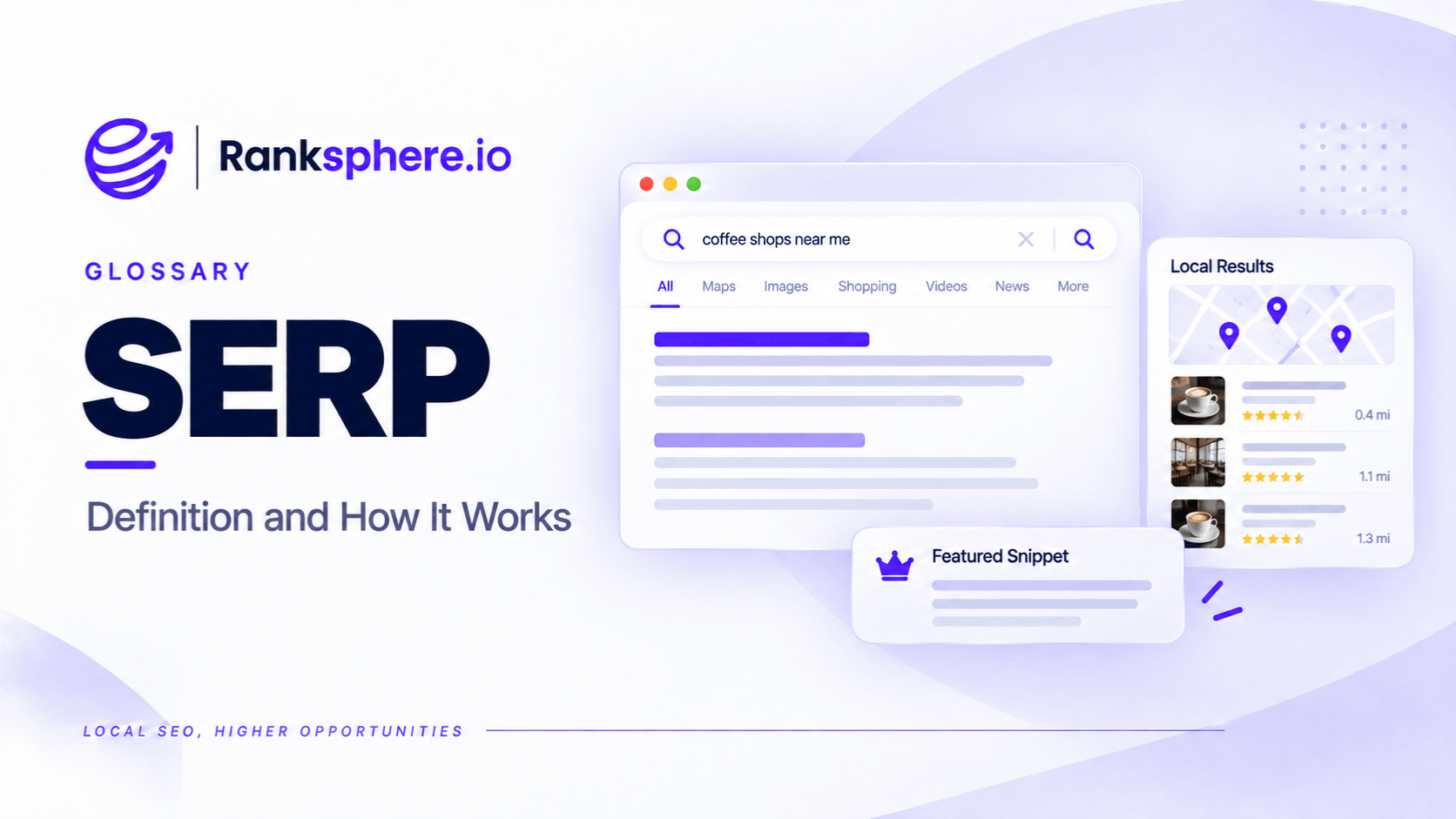
A search engine results page (SERP) is the page a search engine displays after someone enters a search query. It contains the results Google or another search engine considers relevant to that search.
SERP stands for search engine results page.
A SERP can include organic website listings, paid advertisements, local business results, AI-generated answers, images, videos, and other search features.
For example, someone searching Google for "roof repair near me" may see advertisements, a map showing nearby roofing companies, and organic website results.
Someone searching for "how much does roof replacement cost?" may see an AI Overview, informational articles, and related questions instead.
Both are search engine results pages, but they serve different needs.
For SEO, understanding the SERP is important because ranking first organically doesn't necessarily mean your website is the first result someone sees.
Advertisements, local packs, and other features may appear above organic listings.
This means businesses need to understand not only where they rank, but also what appears around their listing.
What Does a Google SERP Contain?
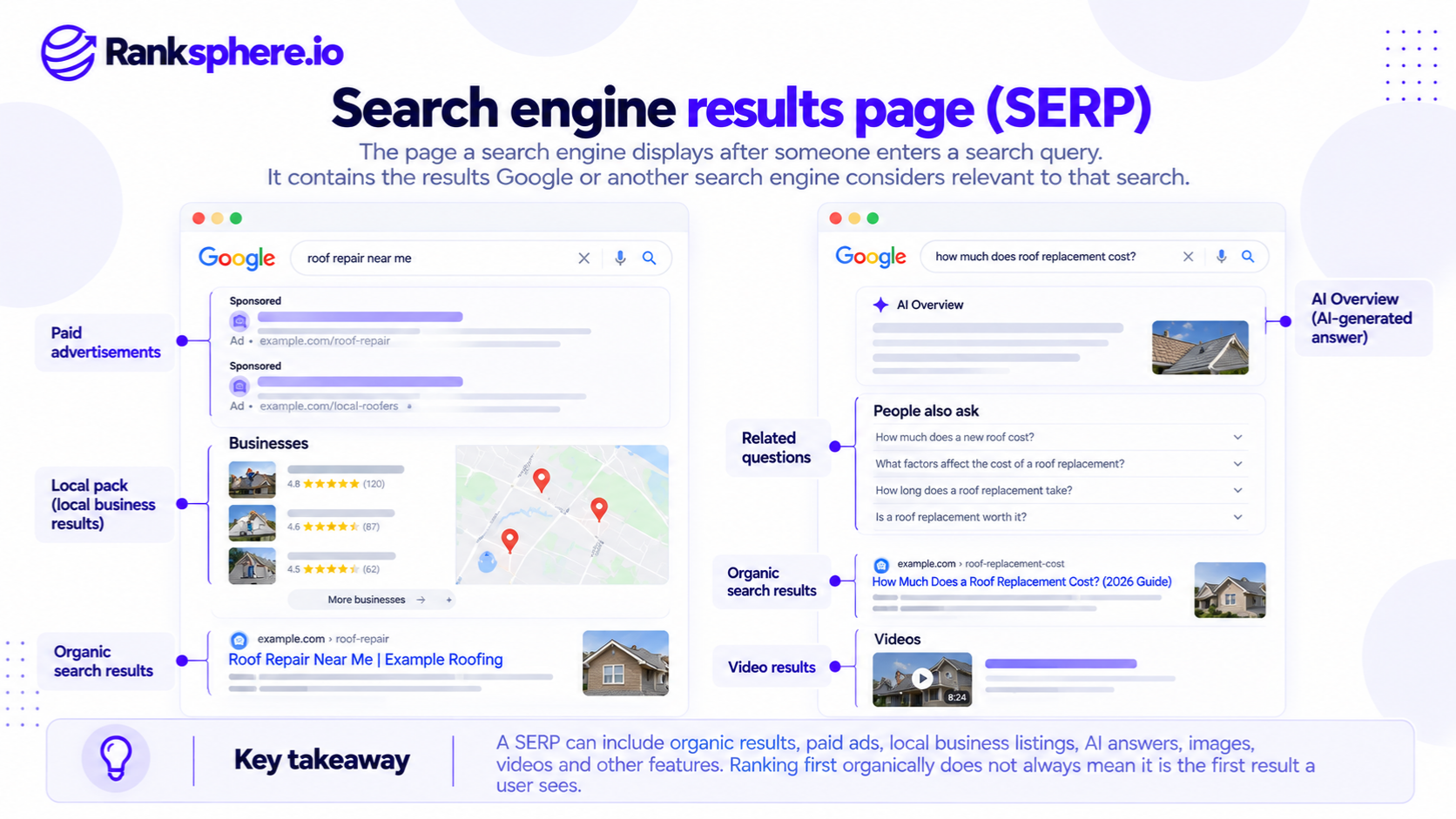
Google's search results vary depending on the query, location, device, and available search features.
Not every results page contains the same elements.
Paid Advertisements
Google Ads may appear above or below organic search results.
For example, a search for "emergency plumber" may display advertisements from plumbing companies.
These are paid placements and are separate from organic rankings.
The number and placement of ads can vary.
AI Overviews
AI Overviews provide AI-generated responses to certain searches.
They may summarise information from multiple sources and display supporting links.
For example, someone searching for a comparison of roofing materials may see an AI-generated explanation alongside relevant websites.
AI Overviews don't appear for every query, and their availability and presentation can change.
Local Pack
The local pack displays relevant local businesses, often alongside a map.
For example, someone searching for "dentist in Manchester" may see a selection of dental practices with ratings, opening hours, and other information.
Local pack visibility is influenced by Google's local ranking systems, including relevance, distance, and prominence.
For local businesses, appearing in the local pack can be important because customers may contact a business directly from its profile without visiting the website.
Featured Snippets
A featured snippet is a search result that highlights information Google selects from a webpage to answer a query.
For example, a search about how to identify a leaking roof may display a short explanation extracted from a relevant article.
Featured snippets don't appear for every informational search, and Google determines when to display them.
People Also Ask
People Also Ask displays questions related to a search.
For example, someone researching dental implants may see questions about treatment costs, recovery time, and suitability.
These questions can help businesses identify related topics worth addressing in their content.
Knowledge Panels
A knowledge panel displays information about certain people, organisations, places, or other entities.
It may appear for searches involving established businesses, public figures, or other identifiable subjects.
The information displayed depends on the entity and Google's available data.
Organic Search Results
Organic results are unpaid website listings selected by Google's ranking systems.
They may include a title, URL, description, and additional search features.
Some organic listings qualify for rich results, while others may display sitelinks.
Organic search results remain important, but their position on the page depends on what other features Google displays.
Other SERP Features
Depending on the query, Google may also display:
- Image results
- Video results
- Shopping listings
- News results
- Maps
- Related questions
- Related searches
These are examples of SERP features.
The combination of features helps explain why two keywords with similar search volumes can produce very different traffic opportunities.
Why SERP Analysis Matters for SEO
One of the most useful steps in keyword research is also one of the simplest: search the keyword before deciding what content to create.
A keyword research tool can estimate search volume and competition.
However, the actual results page provides additional information about how Google currently interprets the query.
Understand Search Intent
The SERP can provide clues about what people want when they search.
For example, consider these queries:
Roof repair cost
The results may contain pricing guides and articles explaining repair costs.
This suggests that many searchers want information before contacting a contractor.
Roof repair near me
The results may include a local pack and nearby roofing companies.
This suggests stronger local service intent.
Roofing materials
The results may contain shopping listings, product pages, and informational resources.
This indicates a different type of search.
However, a SERP feature alone doesn't prove that every searcher has the same intent.
A query may serve several purposes, and Google may display a mixture of results.
Identify the Content Format That Fits
The pages already ranking can help establish which formats appear to meet the query.
For example, if most results for "flat roof repair vs replacement" are comparison guides, a detailed comparison may be appropriate.
If the query returns mostly local contractors and service pages, a purely informational article may be less suitable.
This doesn't mean every new page should copy the format of its competitors.
It means the content should address the underlying search intent.
Understand Who You're Competing Against
A local business's search competitors aren't always its direct business competitors.
For example, a roofing contractor may compete with other local contractors for "roof repair near me."
However, for "how long does a flat roof last?" the results may contain manufacturers, national publications, and industry organisations.
These are different competitive environments.
Understanding the results helps businesses decide whether they have useful information and relevant experience to contribute.
Evaluate Organic Visibility Opportunities
A keyword may have substantial search volume but limited space for prominent organic listings.
For example, the page might begin with:
- Paid advertisements
- An AI Overview
- A local pack
- Related questions
- Organic website listings
Even a high organic ranking may appear farther down the page.
That doesn't make the keyword worthless, but it changes how the opportunity should be evaluated.
Why Organic Ranking Position Doesn't Tell the Whole Story
SEO reports often focus on whether a website ranks first, third, or tenth.
These positions are useful, but they don't explain the complete search experience.
For example, a website ranking first organically may still appear below several advertisements and a local pack.
Another website ranking third for a different query may be visible much sooner.
This is why ranking positions shouldn't be compared without considering the surrounding results.
Position One Doesn't Always Mean First on the Screen
Imagine a dental practice ranks first organically for "dentist in Bristol."
If Google displays advertisements and a local pack above the organic listings, the practice's website may appear below those features.
The business could still receive traffic, but the organic position alone doesn't describe how prominently it appears.
Local Pack and Organic Rankings Are Different
A business may perform well in local pack results while its website ranks lower organically.
The reverse can also happen.
For example, a roofing contractor might rank organically for a useful repair guide but have limited local pack visibility outside the area surrounding its business.
These results are influenced by overlapping but different ranking considerations.
Ranksphere's Local Rank Tracker helps businesses monitor keyword rankings geographically using geo-grid heatmaps, providing a clearer view of local visibility across a service area.
Click-Through Rate Can Change Without a Ranking Drop
A page may maintain a similar ranking position while receiving fewer clicks.
One possible explanation is a change in the search results, such as the appearance of an AI Overview or another feature.
However, a decline in click-through rate can also result from:
- Changes in search intent
- Different competing listings
- Changes in titles or snippets
- Device differences
- Seasonal demand
- Changes in query mix
Don't assume a SERP feature caused the decline without investigating.
Average Position Needs Context
Google Search Console reports an average position metric.
This helps describe where a property's results appear across the impressions included in the report.
However, an average can hide differences between queries, devices, and locations.
For example, a business might rank well for its own name but poorly for competitive service keywords.
Reviewing the individual queries and landing pages provides a more useful picture than relying on one site-wide average.
Why Google SERPs Look Different
Search engine results pages aren't identical for every user or search.
Several factors influence what appears.
Search Location
Location can substantially affect local search results.
Someone searching for "plumber" in Maidstone may see different businesses from someone searching the same term in Canterbury.
Google can use the searcher's estimated location to determine relevant results.
This makes geographic ranking analysis important for local businesses.
Device Type
Mobile and desktop search results may display information differently.
For example, a mobile screen generally shows less content at once than a desktop screen.
Advertisements, maps, and other features can affect how much scrolling is required to reach organic results.
When researching local keywords, check the mobile experience as well as desktop.
Search Settings and Personalisation
Google may use available contextual information, including location, language, and certain account or activity signals, to help determine results.
Using a private browsing window can reduce some personalisation, but it doesn't create a completely neutral search environment.
For consistent research, record the location, device, and search settings used.
Changes Over Time
SERPs can change as Google updates its systems, introduces new features, or responds to changing search behaviour.
For example, a query that previously displayed mostly organic articles may later include an AI Overview.
This is one reason keyword research should be revisited periodically rather than treated as a one-time exercise.
How to Analyse a SERP Before Creating Content
A practical SERP analysis doesn't need to be complicated.
Start with the main keyword and examine the results carefully.
Step 1 — Search the Target Keyword
Use Google to search the exact query you're considering.
If the business serves a specific location, research from an appropriate geographic context.
Step 2 — Identify the SERP Features
Record which features appear.
For example:
- Advertisements
- AI Overview
- Local pack
- Featured snippet
- People Also Ask
- Shopping or image results
This helps establish how the page is organised.
Step 3 — Review the Organic Results
Look at the websites currently ranking.
Consider:
- What type of pages appear?
- What questions do they answer?
- How detailed is the information?
- Are the results local or national?
- What useful information is missing?
Avoid assuming that the longest article is the best result.
Step 4 — Determine the Main Search Intent
Decide whether the query is primarily:
- Informational
- Commercial research
- Transactional
- Navigational
- Local service-oriented
Some queries have mixed intent.
The purpose is to understand what kind of information would best serve the audience.
Step 5 — Choose the Appropriate Page
For example:
| Search query | Potential page type |
|---|---|
| Roof replacement cost | Pricing guide |
| Roofer near me | Local service page and Google Business Profile |
| Flat roof vs pitched roof | Comparison article |
| Emergency roof repair Bristol | Emergency roofing service page |
| How long does a roof last? | Informational guide |
These are starting points, not universal rules.
The actual results and customer needs should guide the final decision.
Step 6 — Monitor the SERP Over Time
After publishing, track rankings, impressions, clicks, and relevant conversions.
If performance changes, check the current SERP again.
The business may be competing in a different search environment from when the content was first published.
Common SERP Analysis Mistakes
- Choosing keywords based only on search volume. Volume doesn't tell you which types of results Google displays.
- Ignoring search intent. A service page may not suit an informational query.
- Assuming position one is always the most visible result. Ads and other features may appear above it.
- Checking rankings from only one location. Local results can vary geographically.
- Ignoring mobile results. Page layout can differ considerably by device.
- Assuming incognito mode removes every influence. Location and search settings still matter.
- Treating the SERP as permanent. Features and rankings may change.
- Blaming every traffic decline on an algorithm update. SERP changes and search behaviour may also affect traffic.
- Copying competing content without adding value. Existing results should inform research, not become templates to reproduce.
SERP Analysis Best Practices
- Search every important target keyword before creating content.
- Review both the organic results and SERP features.
- Consider location and device when researching.
- Identify the likely search intent.
- Choose content formats that meet the reader's needs.
- Examine who is actually competing for the query.
- Track local pack and organic visibility appropriately.
- Review clicks and conversions alongside ranking positions.
- Recheck results when performance changes.
- Look for useful gaps in existing content.
- Avoid creating pages simply because a keyword has high reported volume.
The goal isn't to copy whatever currently ranks.
It's to understand the search environment and create something genuinely useful for the people making that search.
Example of SERP Analysis for a Roofing Company
Consider a hypothetical roofing company called Ashgate Roofing.
The company wants to attract more customers searching for roof replacement services.
Its agency identifies "roof replacement cost" as a promising keyword because a research tool reports relevant search demand.
The agency creates a service page targeting that term, with a short introduction and a quote request form.
What the Agency Missed
Before creating the page, nobody reviewed the actual search results.
When the agency eventually checks the SERP, it finds mostly informational content.
The results include pricing guides, explanations of replacement costs, and questions about roofing materials.
The search appears to have a strong informational component.
The existing service page doesn't adequately answer those questions.
Instead, it asks visitors to request a quote before explaining the factors that affect the cost.
How the Agency Changes Its Approach
The team separates the two needs.
Roof replacement cost
The agency creates a useful pricing guide based on genuine information from the roofing company's completed work.
The guide explains:
- Factors affecting replacement costs
- Differences between roofing materials
- Common additional expenses
- When repairs may be appropriate
- Why an inspection may be necessary for an accurate quote
Roofing contractor in Maidstone
The existing service page is improved to explain the company's services, coverage, qualifications, and how customers can request an estimate.
The agency also reviews the company's Google Business Profile for accurate categories and relevant business information.
How the Agency Measures Performance
The team tracks both queries separately.
For the pricing guide, it reviews relevant search impressions, organic clicks, and visitor engagement.
For the local service query, it considers geographic ranking visibility and relevant customer actions.
It also monitors whether the search results change over time.
Example Shows
“The original mistake wasn't choosing an irrelevant roofing keyword.
It was assuming that a keyword with commercial potential automatically required a service page.
A short review of the SERP could have revealed that customers were looking for pricing information first.
A SERP tells you more than where websites rank. It shows how Google currently presents answers to a particular search and what types of results users are likely to encounter.
For local businesses, understanding that context helps them choose better keywords, build more appropriate pages, and evaluate search visibility beyond a single ranking position.”
See Also
- SERP Feature — Understanding the elements displayed within search engine results.
- Search Intent — Identifying what people want to accomplish when searching.
- Local Pack — Local business results displayed in Google Search.
- AI Overviews — Google's AI-generated search summaries.
- Local Organic Results — Standard organic website listings appearing for local searches.
- Keyword Research — Identifying and evaluating relevant search opportunities.